

By Squarestylist
STANDOUT Foundations
Start your
Squarespace Studio
with confidence
Leverage built-in features to design websites way ahead of the curve—so effortlessly elite, your clients can’t believe it’s Squarespace.

Feeling lost, overwhelmed, or all over the place?
Maybe you tried it on your own. Maybe you gave it a Google or two. Or maybe you asked around for Squarespace course recommendations but didn’t quite get what you’re looking for. So now you’re stuck. Now what?

WONDERING how TO BE A SKILLED SQUARESPACE EXPERT?
“Other designers look like they got their studio all figured out. How do they even do that?”
“This drag-and-drop builder is easy, but maybe too easy—the results look template-y.”
“I’d love to start designing Squarespace sites, but I’m not sure if I’m ready to code just yet.”
“I’ve heard about SEO & Accessibility, but how do I incorporate them in my web design practice?”
“Squarespace’s new Fluid Editor looks flexible but it seems unruly especially in tablets and large screens. It doesn’t look like my Figma design at all!”
“I don’t even know which page width or font size to use to translate my designs to Squarespace”

Where to begin?
do the basics, but better
1Build your Business
We’ll delve deeper into the why of it all to ground your operations in the practical & personal. After all, the very first priority your business needs to serve is yourself.
2Learn the Trade
Set foot on a familiar platform, this time taking modern web design standards on accessibility, responsiveness, SEO, and overall site performance in stride.
3Delight your Clients
Whether you’re onboarding or offboarding, ensure your clients enjoy the entire process of working with you. It’s as simple as it gets.

Let’s get back to Square One
Standout squarespace
foundations
A concise yet comprehensive program on Squarespace’s end-to-end essentials from site strategy to flawless finish that your ideal clients will adore. We’re keeping it clean & classic with a low-code, high-performance approach to the web design business—a glimpse of what Squarestylist can offer.

Squarespace never
looked this good
My many years on this platform have led me through tons of twists & turns. Here’s my takeaway: It doesn’t have to take you that long. These foundational modules are tightly curated to quickly take your designs a cut above the rest, like your perfect pair of high-rise jeans.
BUILD A PROJECT
THE RIGHT WAY
from start to finish
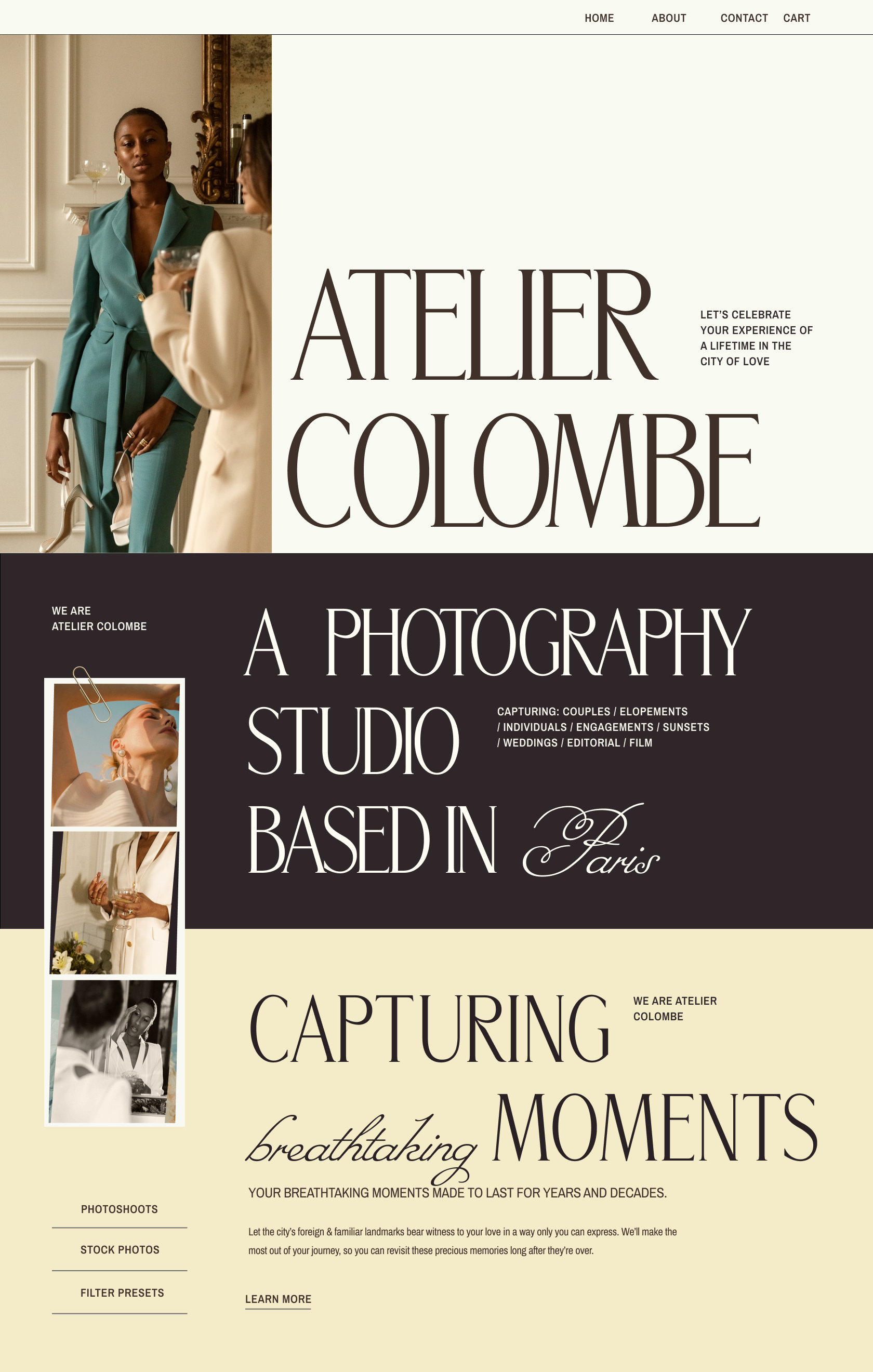
Make visitors scroll through the quaint cafés & cobblestones of Paris for your first hypothetical client, a boutique studio of handpicked photographers. With the Standout Checklist as our reference, I’ll walk you through how to build an entire Squarespace project step-by-step, sharing my trade secrets along the way. with blog, portfolio, courses and shop feature from strategy to testing & launch. We’ll cover all the best practices and tricks in building pages including blog, portfolio, shop, and courses by simply maximizing built-in Squarespace features.
THE MODULES
-

Intentional design
What sets standout sites apart from dull designs? It’s all in the intention—how you gather inspiration, how you frame the strategy, or how you craft experiences both responsive & accessible. These practices are all part & parcel of your future web design expertise.
The Standout®️ checklist
Client forms and guides (Discovery Questionnaire + Content Guide)
Crafting the Website strategy
Wireframe Design Guidelines (Adobe XD & Figma)
Designing with Development in Mind
Responsive Design Best Practices
Championing Accessible Web Experiences + Accessibility Checklist
Considering Site Performance and SEO + Performance Checklist
-

Squarespace Core
Basic doesn’t have to be boring. Finding your edge isn’t in following the rules; it’s in learning the rules to break them. Go explore my trusty tips & tricks to master the new Fluid Editor and the smart ways that we can use Squarespace Blocks & Sections.
You’ll learn how to efficiently translate your XD/Figma design to a pro Squarespace website and be fully informed in deciding which settings to use, may it be page width, font size, row column et al.
Assigning Global Colors the Efficient Way
Installing Custom Fonts, the Standout Way
Typography Tricks
Mastering the Fluid Editor
Section Templates: Ensuring Responsiveness and Browser Compatibility
Smart Ways to use Squarespace Blocks
Autolayout Sections: Tips in Identifying which section or block to use
-

Build-out and Launch
Time to create a stunning site from header to footer. I’ll walk you through the sections, pages, and collections designed to convert clients right from the start. By the end of your first project, you’ll be ready to launch a certified editorial page-turner in the digital space.
Leveraging Saved Sections to built out inside pages
Google Lighthouse Test for pages
Blog vs Portfolio
Setting up Shop (Squarespace Commerce)
Hosting Courses in Squarespace
Shipping & Taxes, Optimization, Handoff
-

Business Unit
What will it take to streamline your studio? Once this overview is over you’ll be thrilled with things that trip you up now: skill setting, client clinchers, premium pricing, the works.
Identifying your Standout Style
What to include in Client contracts? Hint: It needs to have clauses on accessibility and site performance
Using your Product Suite as your Designer Portfolio
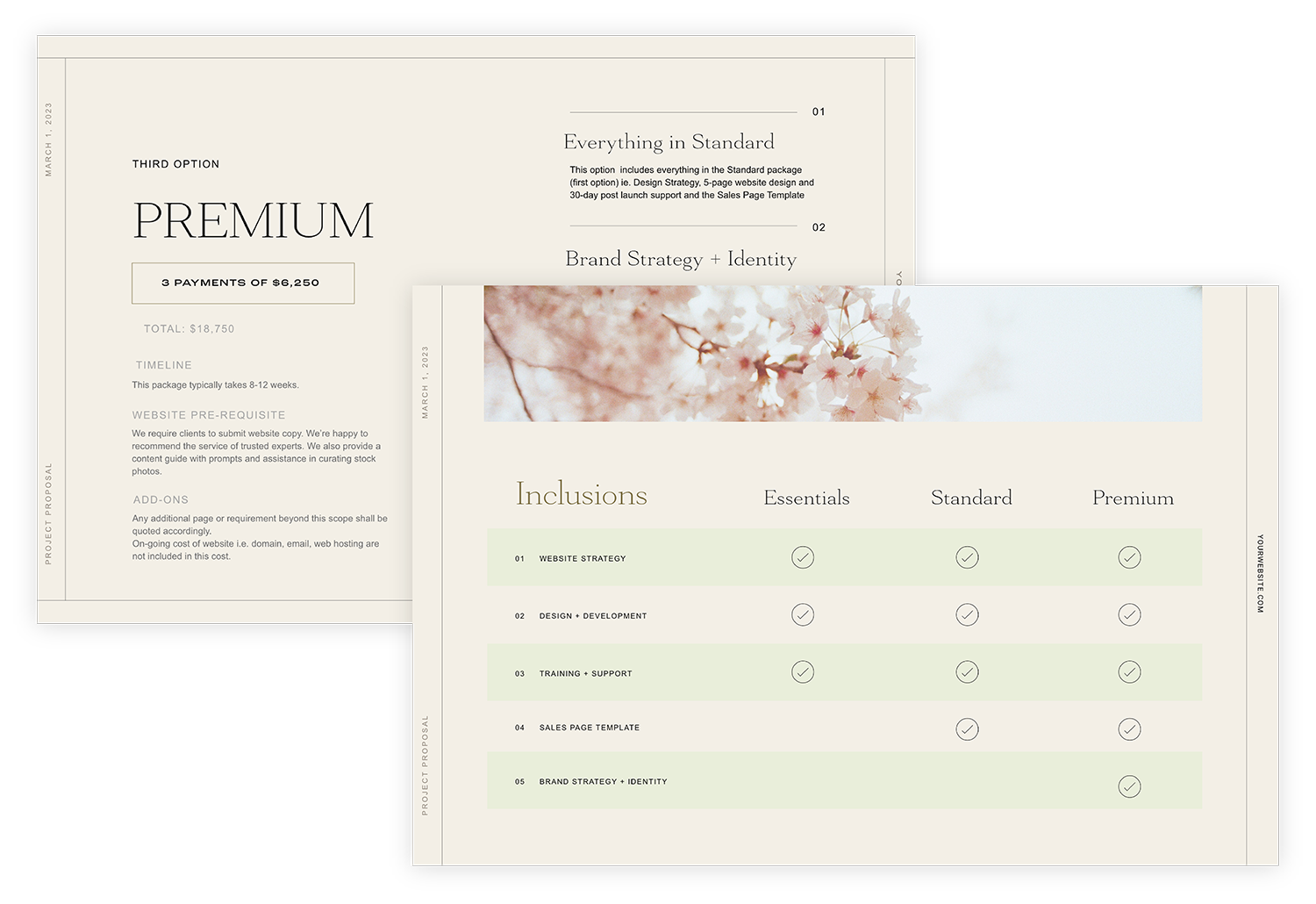
Pricing and Proposal Template
-
New List Item
Description goes here

Be square
in our Q&A space
Our special space on the internet has it all: refresher on the latest lesson, breather from the scope creep, designer for your next collab, what have you. We’ll be there every step of the way to keep you engaged & empowered in the company of curious creatives.
All about the process templates
Don’t tire yourself out trying to reinvent the wheel. I take pride in providing the most comprehensive business resources and templates for web designers. Allow me to show you what works best, all the way from client portals & project vaults to copy prompts & message templates to website strategy & wireframe toolkits. The list goes on and so does your workflow.
The Standout Checklist
It is your go-to reference for every Squarespace web design project to make sure you cover all grounds like website strategy, documentation, website accessibility, responsiveness, site performance & SEO.
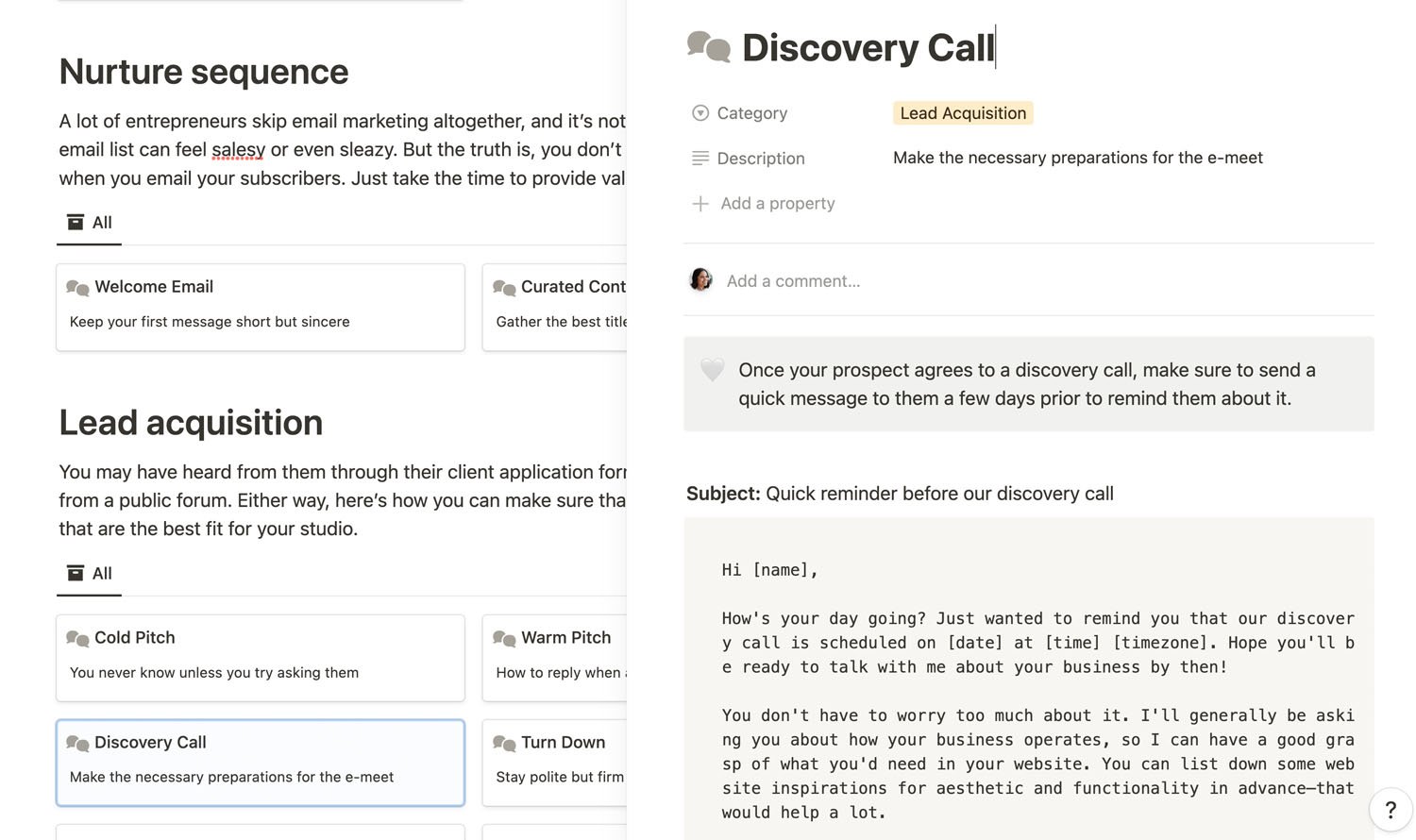
Website Strategy Template
One of our most raved about resources! The website strategy template in Adobe XD and Figma formats allows us to set the game plan for the web project ensuring that we incorporate both user and business goals.
Wireframe Kit
Our Wireframe Kit in Adobe XD and Figma formats is the best starting point in designing for Squarespace. The kit has built-in shapes, icons and sections that are native to Squarespace so you can maximize built-in features.
Website Content Guide
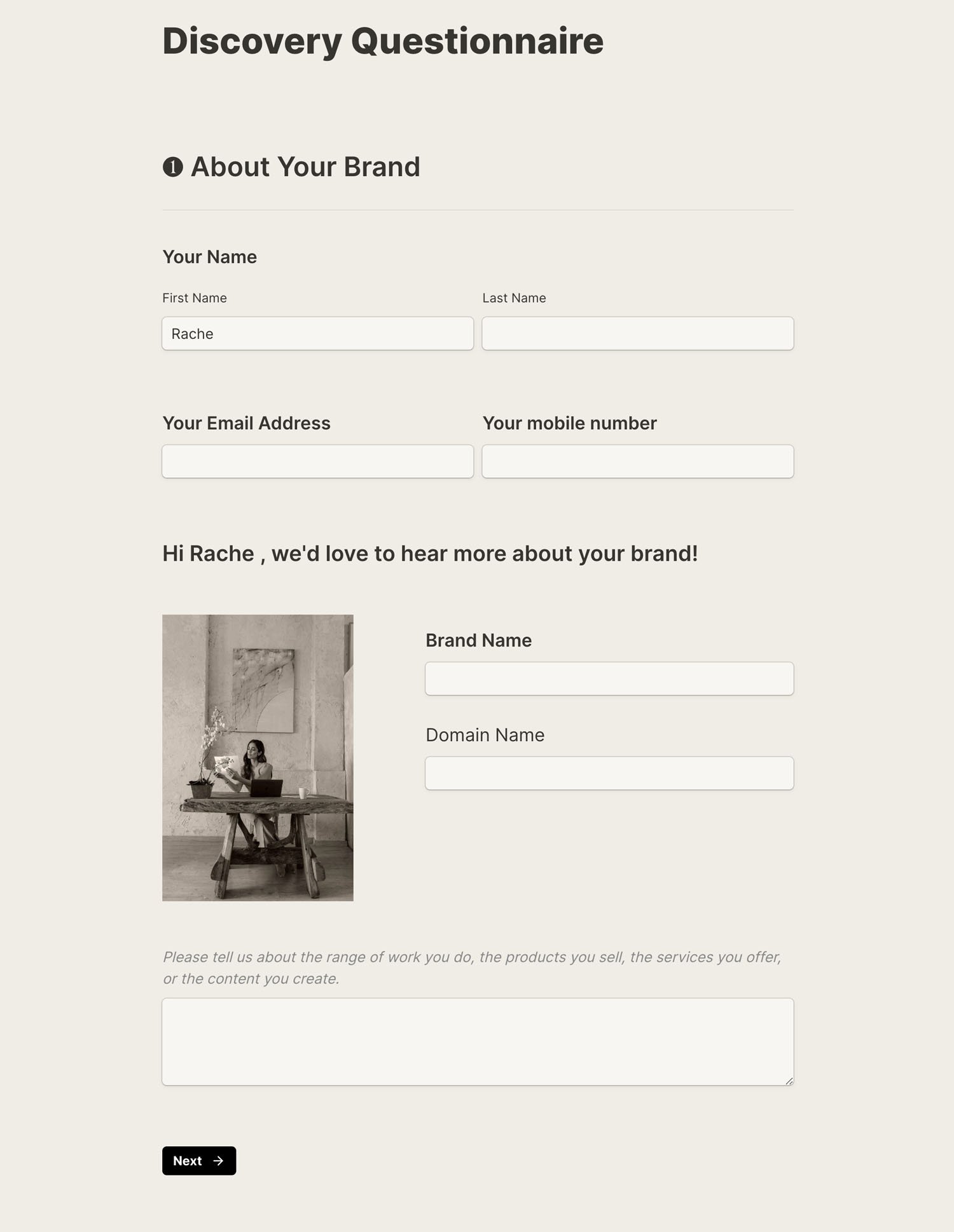
Our website content guide is a visually immersive guide to help clients come up with the website copy. The prompts are based on established copy frameworks and strategies. It’s beautifully laid out in multiple formats i.e Google Docs, Notion and multi-page form
make the first move
Standout Foundations
Payment Plan
4 payments oF $325
Intentional Design
Squarespace Core
Buildout & Launch
Business Unit
Process Templates
Q&A Space
Pay in Full
1 payment of $1297
Intentional Design
Squarespace Core
Buildout & Launch
Business Unit
Process Templates
Q&A Space
STANDOUT Full version
Pay to Upgrade
1 PAYMENT OF $3350
Everything in Foundations
Advanced Modules
The Code Toolkit
Coding Workshops
Coding Support
Live Calls
Guest Expert Sessions
Important Reminders
- Once you are enrolled in Standout Squarespace Foundations, you may upgrade any time to the Full Version by paying the price difference.
- Advanced modules include lessons on coding techniques + coding workshops + coding support
- Any of the plans includes LIFETIME access to the comprehensive modules.
- In the full tier, access to coding support, coding workshops, updates to code toolkit, and live calls is for 12 months only. A special option to renew access will be available.
- If you are a Standout Squarespace alumni or current member, the Foundations Unit has been automatically added to your Course Dashboard. There's no need to re-enroll.
* To learn more about the Stylish Vertical Tabs Plugin, please refer to this page.
Keep it lite or upgrade to full
By signing up for this foundational course, you earn credits towards the full version of Standout Squarespace. That means you can upgrade by simply paying the price difference between the Foundations and the Full Version.
**Foundational Modules: Lessons about building a Squarespace site from end to end by leveraging built-in features. Minimal coding only.****Advanced Modules: Lessons about coding techniques in Squarespace.*| Foundations | Full Version | |
|---|---|---|
| Business Unit | Yes | Yes |
| Process Templates | Yes | Yes |
| Foundational Modules | Yes | Yes |
| Q&A Space | Yes | Yes |
| Advanced Modules | No | Yes |
| The Code Toolkit | No | Yes |
| Coding Workshops | No | Yes |
| Coding Support | No | Yes |
| Live Calls | No | Yes |

Meet Your mentor
Hi there,
I’m Rache
I’m a self-educated web designer & developer who enables creative entrepreneurs to stand out with skills & create the unexpected.
You might know me by my first course, Standout®️ Squarespace. Many designers marvel at how it unfolds advanced coding concepts in simple & intuitive ways. Yes, there is value in pushing the envelope with CSS & JavaScript. But I believe there is also value in grasping the essentials—in appreciating the corners of business & design.
When I quit my job as a chemical engineer, I had no coding knowledge in my hands. I only had two things: the belief in business & the desire to design. The former made me determined to find freedom in my life; the latter made me committed to continue my craft.
These were the codes I lived by, even before the actual code.
By passing on these foundational modules, I hope to instill not only the pursuit of knowledge but also the promise of a fulfilling life. You can weave your dream from the desires & delights of your own hands, the way I did. No more untangling knots of know-hows. No more tracing forum threads that lead to dead-ends. No more knitting your brows trying to figure out where to start.
If you’re too terrified to take the leap, just take the first step here in Standout®️ Foundations.
-
The Full Standout Squarespace program has three main components:
1. Foundational Modules
2. Advanced Modules (include coding techniques)
3. Coding Workshops & SupportThis program grants you access to the foundational modules of Standout Squarespace. That means we’re focusing on the cornerstones of this craft: website design, Squarespace proficiency, & business strategy. You’ll have much to learn if you’re an aspiring web designer who is still unsure if coding is a good fit for you.
There might not seem to be much in this foundational course at first glance. But to be honest, I still see a lot of unnecessary blocks whenever I troubleshoot websites built by experienced designers. It’s why I made this part more accessible so you can focus on streamlining your process—how to properly add blocks in the Fluid Engine, for instance—even when you have not yet decided on actively learning CSS or JavaScript.
-
When you enroll, you get access to a special subspace in the Standout Squarespace Circle community where you can ask away about the course. Feel free to discuss content, raise clarifications, or suggest improvements related to the topics covered in the Foundational modules.
Within the same community, there are dedicated spaces where I post coding workshops, host live calls, and provide personalized coding support. Note that these spaces are not included in the Foundations Tier. You will only unlock access to these spaces if you upgrade to our Full Standout squarespace program.
The community is hosted in Circle because I know our conversations could serve as a valuable repository for everyone in the group. For this reason, I choose to provide a platform more suited to organize topic threads without them getting lost in your notifications.
Don’t worry, my team and I will be there to personally answer your questions, so you feel supported every step of the way.
My intention is to empower you in web design & strategy so you can confidently make long-term business decisions moving forward. I’d love to guide you within my capacity as you nurture your studio based on your own needs & sensibilities. That said, our Q&A may not be the most suitable avenue for more urgent matters.
-
Standout Squarespace Foundations covers the basic concepts discussed within our signature course. You can expect to learn all about Squarespace design, strategy, and business fundamentals within the available modules. By the end of this short course, you’ll be confident in your ability to maximize the platform’s built-in features, position yourself as a design-driven creative, and curate a holistic experience for your clients.
We intended this program as a beginner-friendly guide for anyone who dreams to work within the web design industry. If you’re already managing your own studio in this space but still looking to expand your knowledge on design or business, this can also be a great fit for you. Many students have told me this course helped them achieve a breakthrough in their process even when they’ve designed Squarespace sites for years.
However, more experienced designers looking to push the envelope in terms of CSS and JavaScript might want to consider the full version Standout Squarespace instead.
-
In our business module, we’ll be talking at length about positioning your studio, setting up your tech stack, and streamlining your workflow to improve the client experience. These are valuable information you’ll need in the industry. That being said, kindly note that I am no lawyer or accountant—please consult a professional for your more specific legal or financial concerns.
-
I’ve explored various platforms throughout my career as a web designer & developer. To teach myself the fundamentals, I tried Webflow, WordPress, Showit, and Shopify. At one point I even coded a website from scratch and hosted it on Netlify.
Eventually, Squarespace became my go-to website builder because it’s simple to get started yet flexible enough for coding customizations & e-commerce options later on. I believe it brings most value to clients by making websites delightful to maintain & update.
-
No need to upgrade to any paid Squarespace plan to get started. My team can give you access to 6-month or one-year trials for your clients. Also, we can facilitate your Squarespace Circle membership so you can initiate 6-month trials yourself. If you wish to publish your own site, you’ll need to subscribe to applicable Squarespace plans.
-
YES! The foundational modules guide you through the Fluid Engine in line with Squarespace 7.1’s current requirements. Take note though that you can apply high-level business & design concepts retroactively to previous versions, such as classic sections and the version 7.0, or even other website builders.
-
No need for you to worry about missing out. Once you sign up for Standout®️ Foundations, you’ll have lifetime access to foundational resources: the foundational modules, the business unit, the process templates, even the Q&A space. We would also keep you in the loop in case of any essential updates on the course materials.
If you opt to upgrade to the full Standout Squarespace program, there is limited-time access to coding workshops and coding support. Access to coding workshops and support is until Dec 31, 2024 only. An option to renew access will be available.
Here’s a summary:
Foundational Modules: LIFETIME ACCESS
Advanced Modules: LIFETIME ACCESS
Coding Workshops, Support, Toolkit Updates: LIMITED-TIME ACCESS until Dec 31, 2024 only
-
Currently, you can get Standout®️ Foundations at $1297. I do understand that this could be quite the investment, so we’re also offering an alternative to pay $325 for 4 months. Whether you pay in full or go for our more flexible payment plan is all up to you.
If you take this course and decide to learn coding eventually, you can upgrade to the full version of Standout Squarespace by paying the difference.
-
Due to the digital nature of the program, we do not offer refunds. Please reach out via email, Instagram, or the chat button for any questions or clarifications. We’d love to help you make sure that this course is a great fit for you.
Questions?
Have some more questions? Please feel free to leave your questions via the chatbox button at bottom right of the screen.
make the first move
Standout Foundations
Payment Plan
4 payments of $325
Intentional Design
Squarespace Core
Buildout & Launch
Business Unit
Process Templates
Q&A Space
Pay in Full
1 payment of $1297
Intentional Design
Squarespace Core
Buildout & Launch
Business Unit
Process Templates
Q&A Space
STANDOUT Full version
Pay to Upgrade
1 PAYMENT OF $3350
Everything in Foundations
Advanced Modules*
The Code Toolkit
Coding Workshops
Coding Support
Live Calls
Guest Expert Sessions
Important Reminders
- Once you are enrolled in Standout Squarespace Foundations, you may upgrade any time to the Full Version by paying the price difference.
- Advanced modules include lessons on coding techniques + coding workshops + coding support
- Any of the plans includes LIFETIME access to the comprehensive modules.
- In the full tier, access to coding support, coding workshops, updates to code toolkit, and live calls is for 12 months only. A special option to renew access will be available.
- If you are a Standout Squarespace alumni or current member, the Foundations Unit has been automatically added to your Course Dashboard. There's no need to re-enroll.
* To learn more about the Stylish Vertical Tabs Plugin, please refer to this page.
Still unsure if Standout Squarespace
Foundations is right for you?
That’s totally understandable! Feel free to send us a message via the chat box (lower right of the screen).